Executing Workflows Using Python
Overview:
This guide outlines the steps to allow users to execute a workflow using a provided host URL, headers, and Workflow ID from the Command Line Interface. It triggers a workflow/rule and retrieves the execution status and result. The result can be saved in an output JSON file.
Steps:
1. Pre-Requisites:
For scripts, refer to the Sample Code Snippets section below.
Before initiating the workflow automation, ensure the following pre-requisites are met:
- Python Environment: Ensure that Python is installed on the system where the automation will be performed.
- iceDQ Configuration: Confirm that the iceDQ is set up and configured correctly.
- You need to have the
runWorkflow.pyfile in any folder you choose (refer script). - You need to have a
libfolder that includes functions:rule.py. Thelibfolder must be situated within the folder containing therunWorkflow.pyfile.
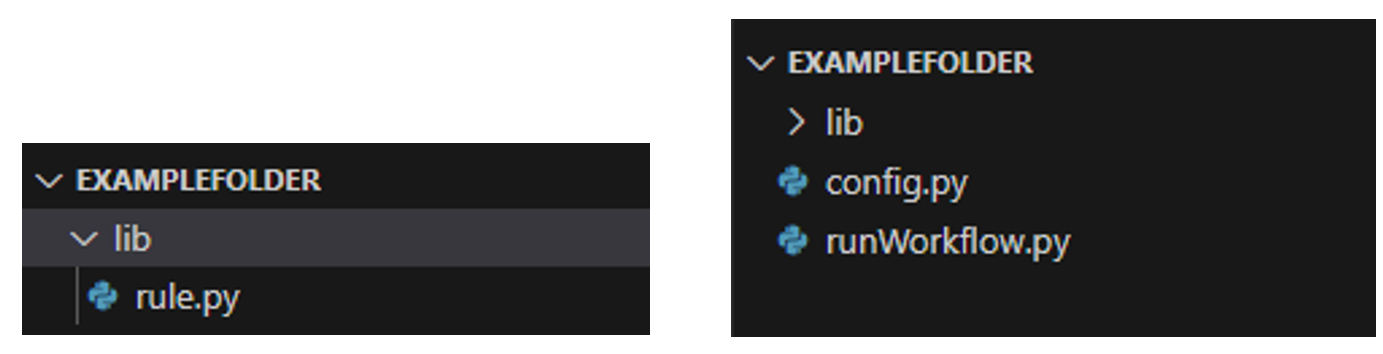
- You need to have the
config.jsonfile in the same folder asrunWorkflow.pyfile. - You may have a folder to house the execution logs. The path of this folder will then have to be specified as the
-lffor Log Folder argument during execution. - You may have a folder to house the execution details as an output. The path of this folder will need to be specified as the
-offor Output folder path argument during execution. - You may want to specify the name of the output JSON file. The name of this file will then need to be specified as the
-ofor Output File Name argument during execution. - If you do not specify either the logsfolder info or output folder info or both, then by default logs and/or output folders will be created within the folder in which the
executeWorkflow.pyfile is located. The name of the output JSON file will be a defaultoutput.json.
2. Pre-Setup:
Prior to executing the workflows, perform the following pre-setup tasks:
- Get Config Details: The configuration file
config.pycontains a required object. You need to enter the Authorization token and Workspace-Id and values in the header payload. - Workflow ID: Ensure that you have the
workflow_Idof the workflow you want to execute. - Base URL: Ensure that you have the base URL of your iceDQ instance.
3. Script Functionality Overview
This is an overview of how the scripts functionality:
-
Script Structure:
- Initialize values, parse options, read configuration, and set up dates.
- Execute the workflow, log details, and handle output.
-
Function Structure (
executeWorkflow):- Define
executeWkflfunction for triggering workflow runs. - Handle HTTP POST requests and return responses.
- Define
-
Function Structure (
getExecutionResult):- Define
getExecutionResultWithPollingfunction for polling results. - Accept parameters and return when execution is completed.
- Define
-
Error Handling:
- Manage unexpected input in the script and function parameters.
- Use try-catch blocks for logging exceptions and handle HTTP response errors.
4. Command Line Arguments
Below are the Command Line Arguments relevant to executing Workflows:
| Flag | Note |
|---|---|
| -baseurl | The host URL. |
| -id | The ID of the rule/workflow to be executed. |
| -async | Asynchronous status, either True or False. |
| -outname | Output file name for saving the execution result. |
| -outpath | Output folder path. |
| -logsfolder | Log folder path. |
This is how you can execute an iceDQ Workflow using a Python script through the Command Line Interface. The following is the full standard format:
python run_workflow.py [-H HOSTURL] [-id WORKFLOW_ID] [-async ASYNCHRONOUS] [-o OUTPUT] [-of OUTPUT_FOLDER] [-lf LOG_FOLDER]
The following is the output you will receive if the execution is successful:
yyyy-mm-dd hh-mm-ss [INFO] Execution Rule:{"instanceId":#####}
yyyy-mm-dd hh-mm-ss [INFO] Workflow Status: running
yyyy-mm-dd hh-mm-ss [INFO] Workflow still running…
....
....
yyyy-mm-dd hh-mm-ss [INFO] Workflow Status: Success
yyyy-mm-dd hh-mm-ss [INFO] Execution Result: {response json}
yyyy-mm-dd hh-mm-ss [INFO] Execution is successful.
yyyy-mm-dd hh-mm-ss [INFO] Execution result saved to {default output path}
This is the error you may get if the authorization fails:
yyyy-mm-dd hh-mm-ss [INFO] {"code":"RequestUnauthorized","message":"Invalid bearer token for user."}
5. Post Execution To Dos
After executing the workflows, perform the following post-execution tasks:
- Review Logs: Analyze the script logs to identify any issues or anomalies during the execution.
- Result Verification: You may manually verify the test results in iceDQ (optional).
- Documentation: Document the output JSON file to maintain records of the improvement/deterioration of data quality.
Sample Code Snippets
rule.py
import requests
import json

# Execute Rule and get instance id
def execute_rule(hostUrl, headers, object_id):
    url = f"{hostUrl}/workflowruns:trigger"

    payload = json.dumps({
        "objectId": object_id
    })

    response = requests.post(url, headers=headers, data=payload)

    # return response.text
    if response.status_code in [200,202]:
        # print("Response code is 200 - success")
        return response
    else:
        # print(f"Response code is {response.status_code} not 200 - failure")
        return response
        print(response.text)
        exit()

# Get Execution Result
def get_execution_status(hostUrl, headers, id):
    url = f"{hostUrl}/workflowruns/{id}"

    payload = json.dumps({})

    response = requests.get(url, headers=headers, data=payload)

    # return response.text
    if response.status_code in [200,202]:
        # print("Response code is 200 - success")
        return response
    else:
        # print(f"Response code is {response.status_code} not 200 - failure")
        print(response.text)
        exit()

# Get Execution Result
def get_execution_result(hostUrl, headers, object_id, id):
    url = f"{hostUrl}/workflowruns/{id}/result"

    payload = json.dumps({
        "objectId": object_id
    })

    response = requests.get(url, headers=headers, data=payload)

    # return response.text
    if response.status_code in [200,202]:
        # print("Response code is 200 - success")
        return response
    else:
        # print(f"Response code is {response.status_code} not 200 - failure")
        print(response.text)
        exit()
config.py
# hostUrl='http://api.icedq.net/api/v1'
token='enter accessToken here'
Workspace_id='enter workspace id here'
headerPayload = {
  'Accept': 'application/json',
  'Content-Type': 'application/json',
  'Workspace-Id': Workspace_id,
  'Authorization': 'Bearer ' + token
}
runWorkflow.py
from lib import rule
from time import sleep
import argparse
import datetime
import config
import logging
import os
import json
import sys

# Get the full path of the script file
script_path = os.path.abspath(__file__)

# Extract the file name without the extension
script_name = os.path.splitext(os.path.basename(script_path))[0]

# Check if no arguments are provided or if "--help" or "-h" is present
if len(sys.argv) == 1 or '--help' in sys.argv or '-h' in sys.argv:
    print(f"Usage: python {script_name}.py [-H HOSTURL] [-id WORKFLOW_ID] [-async ASYNCHRONOUS] [-o OUTPUT] [-of OUTPUT_FOLDER] [-lf LOG_FOLDER]")
    sys.exit(0)

# Define command-line arguments
parser = argparse.ArgumentParser()

parser.add_argument("-H", "--hostUrl", required=False, help="The host URL")
# parser.add_argument("-t", "--token", required=False, help="Your access token")

# Rule id argument
parser.add_argument("-id", "--workflow_id", required=False, help="Your Rule Id")

# Asynchronous argument
parser.add_argument("-async", "--asynchronous", required=False, default=False, type=bool, help="Asynchronous Status either True or False")

# Output file path argument
parser.add_argument("-o", "--output", required=False, help="Output file name")

# Output folder path argument
parser.add_argument("-of", "--output_folder", required=False, help="Output folder path")

# Log folder path argument
parser.add_argument("-lf", "--log_folder", required=False, help="Log folder path")

args = parser.parse_args()

# Get current date and time
logsTime = datetime.datetime.now()

# Create default folders for logs and output
log_directory = args.log_folder or "default-logs"
output_directory = args.output_folder or "default-output"

os.makedirs(log_directory, exist_ok=True)
os.makedirs(output_directory, exist_ok=True)

# Generate unique log file name using a timestamp
log_file = os.path.join(log_directory, f"LogFile_{logsTime.strftime('%Y%m%d')}.log")

# Configure Logging
logging.basicConfig(level=logging.INFO, format="%(asctime)s [%(levelname)s] %(message)s", datefmt='%d-%b-%Y %H:%M:%S')

# Create a handler to log to the file
file_handler = logging.FileHandler(log_file)
file_handler.setLevel(logging.INFO)
file_handler.setFormatter(logging.Formatter("%(asctime)s [%(levelname)s] %(message)s", datefmt='%d-%b-%Y %H:%M:%S'))
logging.getLogger().addHandler(file_handler)

# Define variables from config file
token = config.token
headers = config.headerPayload

# set a variable for command-line arguments
rule_id = args.workflow_id

# Set default paths for logs and output files
default_log_file = os.path.join(log_directory, f"DefaultLogFile_{logsTime.strftime('%Y%m%d')}.log")
default_output_file = os.path.join(output_directory, f"DefaultOutput_{logsTime.strftime('%Y%m%d')}.json")

# host_url = args.hostUrl or logging.error("Error: You must provide 'hostUrl'")
if args.hostUrl:
    host_url = args.hostUrl
else:
    logging.info("Error: You must provide 'hostUrl'")
    sys.exit()

asynchronous_flag = args.asynchronous

if not asynchronous_flag:
    execution_response = rule.execute_rule(host_url, headers, rule_id)
    logging.info("Execution Rule:" + execution_response.text)
    instance_id = execution_response.json()["instanceId"]
else:
    execution_response = rule.execute_rule(host_url, headers, rule_id)
    logging.info("Execution Rule:" + execution_response.text)
    sys.exit()


# Continuously check the status is in Running, Success, or Error
while True:
    status_response = rule.get_execution_result(host_url, headers, rule_id, instance_id)
    sleep(5)

    status = status_response.json()["status"]
    logging.info("Status: " + status)
    sleep(5)

    if status == "running":
        logging.info("Rule is still Running...")
        sleep(5)

    elif status == "success":
        sleep(5)
        logging.info("Get the status of execution:" + status_response.text)
        logging.info("Execution is successful.")
        break

    elif status == "error":
        sleep(5)
        error_description = status_response.json()["workflowInfo"]["activities"][0]["instance"]["error"]
        logging.info(f"Error Description: {error_description}")
        logging.info("Execution failed")
        sys.exit()

    else:
        sleep(5)
        logging.info(f"Execution status is {status}. Exiting...")
        logging.info("Execution Result:" + status_response.text)
        break

# Check if the output argument is provided
if args.output:
    json_file_path = os.path.join(output_directory, args.output)
else:
    json_file_path = default_output_file

try:
    with open(json_file_path, 'w') as json_file:
        json.dump(status_response.json(), json_file, indent=4)
        logging.info(f"Execution result saved to {json_file_path}")
except Exception as e:
    logging.error(f"Error while saving execution result to JSON file: {e}")

logging.shutdown()